MediaTek MT7925 Bluetooth Disappeared After a RHEL Upgrade - and Delayed Boot by 65 Seconds
 rio
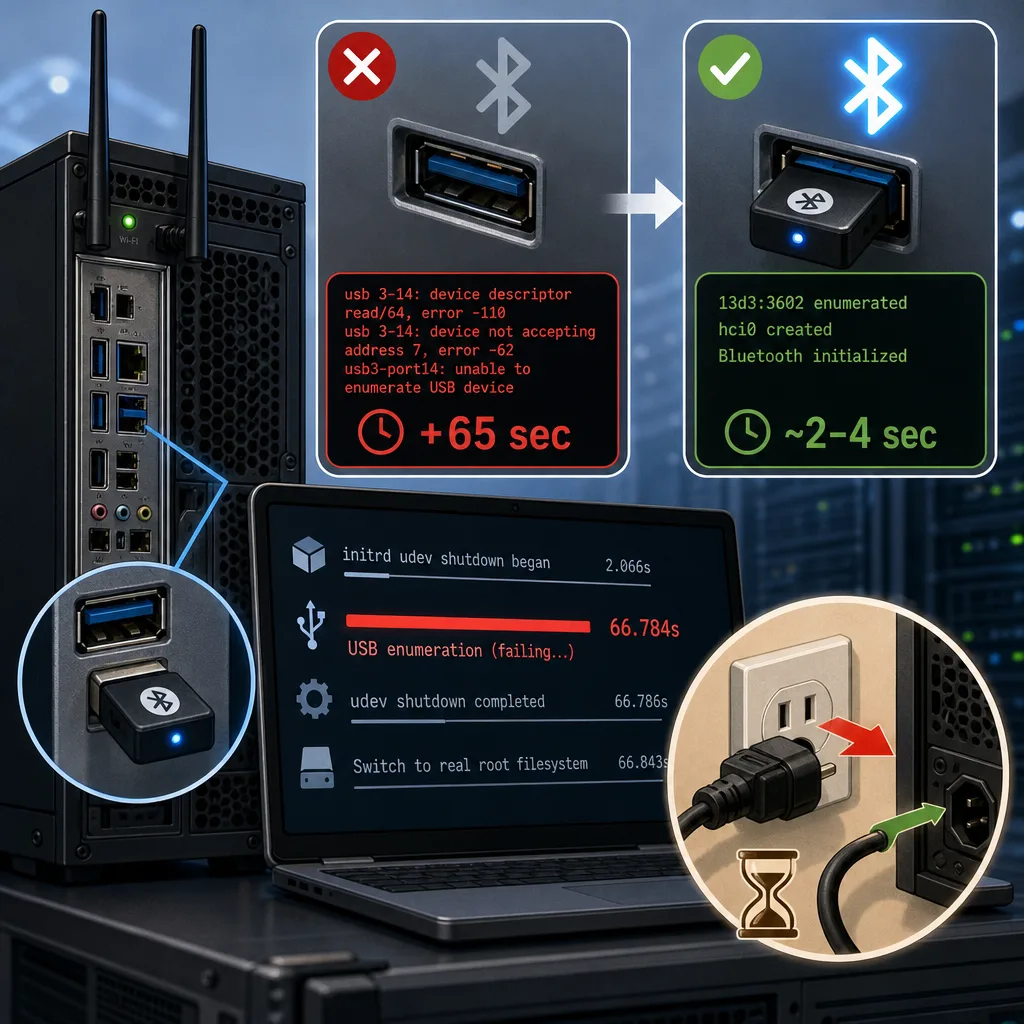
After upgrading a server to RHEL 10.3, its onboard Bluetooth controller stopped appearing in Linux. USB enumeration repeatedly timed out, adding approximately 65 seconds to boot.
The problem survived ordinary reboots, including booting a newer RHEL kernel. A complete shutdown followed by disconnecting AC power restored the device. A subsequent ordinary reboot also succeeded. No custom kernel, BIOS update, or Bluetooth firmware replacement was required.
Hardware and Software
| Component | Configuration |
|---|---|
| Motherboard | ASUS TUF GAMING B860M-PLUS WIFI |
| CPU | Intel Core Ultra 7 265 |
| Chipset | Intel B860 |
| BIOS | Version 0410, dated October 22, 2024 |
| Wireless chipset | MediaTek MT7925, AzureWave subsystem |
| Wi-Fi interface | PCIe, ID 14c3:7925, subsystem 1a3b:6000, driver mt7925e |
| Bluetooth interface | USB, ID 13d3:3602, driver btusb with MediaTek support |
| USB host controller | Intel 800 Series xHCI, PCI ID 8086:7f6e |
| Operating system | RHEL 10.3 |
| Initial affected kernel | 6.12.0-264.9.1.el10_3.x86_64 |
| Kernel used for recovery | 6.12.0-264.16.1.el10_3.x86_64 |
| Bluetooth firmware build | 20261016233221 |
The Wi-Fi and Bluetooth functions use different interfaces: Wi-Fi connects over PCIe, while Bluetooth connects over USB. Consequently, successful Wi-Fi initialization does not mean the Bluetooth function is healthy.
Symptoms: Failure Before the Bluetooth Driver Could Initialize
The kernel repeatedly reported errors on USB 3-14:
usb 3-14: device descriptor read/64, error -110
usb usb3-port14: attempt power cycle
usb 3-14: device not accepting address 7, error -62
usb usb3-port14: unable to enumerate USB device
At this stage, Linux could not retrieve a USB vendor/product ID. There was no Bluetooth controller under /sys/class/bluetooth.
This was not a missing device name in hwdata, nor simply a missing Bluetooth driver match. USB enumeration was failing before driver binding could take place.
Initially, identifying the device as Bluetooth was only an inference. After recovery, the same port enumerated as 13d3:3602, and hci0 appeared beneath 3-14:1.0, confirming its identity.
The notation 3-14 means USB bus 3, port 14—not a numbered external USB 3 connector. Its ACPI path was:
\_SB_.PC02.XHCI.RHUB.HS14
Why an Unused Bluetooth Device Delayed the Server
Although the server did not use Bluetooth, the failed device affected early boot.
The initrd had largely finished its work after about two seconds, but stopping its udev service remained blocked until USB enumeration attempts ended.
| Milestone | Before recovery |
|---|---|
| initrd udev shutdown began | 2.066 seconds |
| USB enumeration was abandoned | 66.784 seconds |
| udev shutdown completed | 66.786 seconds |
| Switch to the real root filesystem | 66.843 seconds |
The close timing established that the USB failure was on the boot-critical path. This was not merely harmless logging occurring in parallel with startup.
It did not explain every second of the server’s overall startup: application initialization, including loading an AI model, added separate delays.
Upstream Fixes: Similar Symptoms, Different Problems
Research found several MT7925-related changes, but they addressed different failure stages.
The RHEL changelog associated RHEL-184812 with Wi-Fi updates. Bluetooth changes were tracked separately, including RHEL-184635. A Wi-Fi driver update should therefore not be assumed to fix Bluetooth enumeration.
One upstream MT7925 patch triggers a reset when a Bluetooth WMT command times out. However, that recovery starts after successful USB enumeration, unlike this incident.
A separate Ryzen remote-wakeup fix deliberately enables its workaround only on Zen-based systems with the appropriate USB topology. That condition does not match this Intel machine.
The closest proposal was USB hub recovery using ACPI _PRR and _RST. It attempts a firmware-defined hardware reset when normal USB recovery fails. This mechanism is not inherently Ryzen-specific.
The proposal applied cleanly in a dry run against the exact RHEL kernel source. Nevertheless, its effectiveness depended on an active, correctly wired ACPI reset resource. Static firmware definitions alone did not establish that. No patched kernel was compiled or installed.
Resolution: Remove AC Power, Not Just Reboot
The recovery procedure was:
- Shut down the operating system normally.
- Disconnect the AC power cable and wait approximately one minute for standby power to dissipate.
- Reconnect power and start the server.
An ordinary reboot does not necessarily pass through S5 or remove peripheral power. Even S5 shutdown can leave standby power available. Disconnecting AC power allows a G3-equivalent power-off after discharge.
After this procedure, Bluetooth initialized normally:
| Measurement | Cold start after AC removal | Subsequent ordinary reboot |
|---|---|---|
| USB device identified | 1.61 seconds | 1.54 seconds |
| Bluetooth setup completed | 4.65 seconds | 3.17 seconds |
| Switch to the real root filesystem | 2.12 seconds | 2.15 seconds |
The approximately 65-second USB-related delay disappeared. The kernel, BIOS, and installed Bluetooth firmware remained unchanged across the failed warm boot and successful cold start.
Interpretation and Current Policy
The results support a device-internal state that survived warm resets but was cleared by complete power removal.
This is consistent with an upstream discussion describing problems after combined kernel and Bluetooth firmware upgrades, where a global reset was needed to transition away from previously loaded firmware.
That is a plausible explanation, not a proven root cause. The investigation did not establish whether the fault originated in firmware, driver reset handling, or platform power sequencing.
The successful subsequent warm reboot also shows that this was not an inevitable failure on every restart.
For now, the system remains on the vendor kernel without additional firmware changes. If the problem recurs, further reset-path investigation—or disabling unused Bluetooth in BIOS—would be justified. A custom kernel is not currently necessary.