macOSのスクショをwebpにしたい
 rio
rio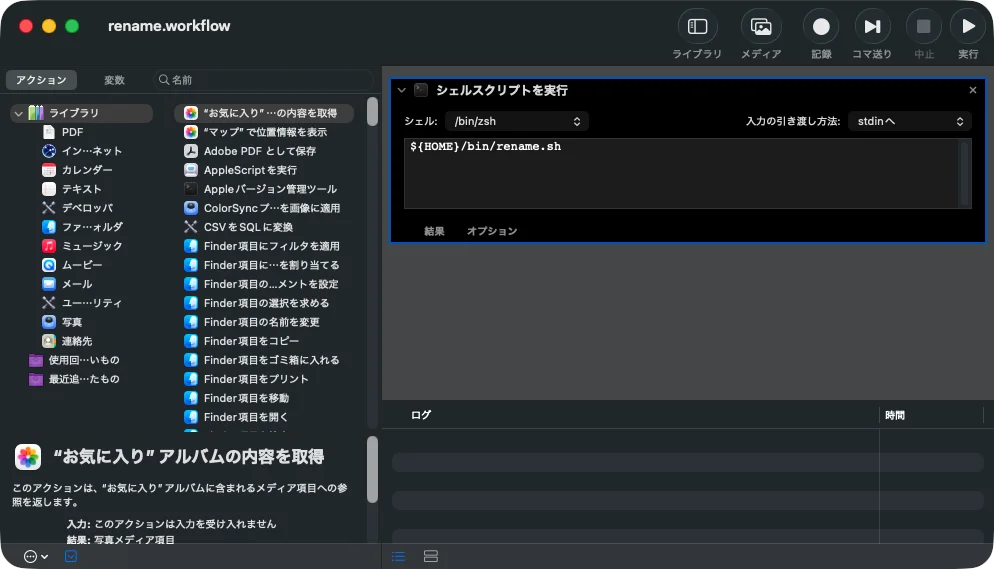
スクショをデスクトップにpngで保存するようにdefaultsコマンドで変更しているのだけど、
# Screen Capture
domain="com.apple.screencapture"
# 影をなくす
defaults write ${domain} disable-shadow -bool true
# ファイル名:"ScreenShots"
defaults write ${domain} name "ScreenShots"
# 保存形式:PNG
defaults write ${domain} type -string "png"
# 保存場所
defaults write ${domain} location -string "${HOME}/Desktop"
それをブログに貼り付けると容量がデカいので、どうしたものかと思っていたのだけど、Folder Actionでrenameする時にwebpにしちゃえば良いんだな、と。
呼び出すrename.shはこんな。
#!/bin/zsh

defaults_domain="com.apple.screencapture"

# 同時起動防止用のロック(mkdir はアトミック)
lockdir="/tmp/rename.sh.lock"

# 既に他インスタンスが動いていれば取得できるまで待つ。
# 後続のスクショもまとめて処理させたいので、待ってから順次実行する。
while ! mkdir "${lockdir}" 2>/dev/null; do
    sleep 0.5
done

# 異常終了時もロック解放
trap 'rmdir "${lockdir}" 2>/dev/null' EXIT INT TERM

# 直後に発火した別インスタンスが同じファイルを掴まないよう、
# 撮影完了を少し待ってからグロブする
sleep 0.5

# Read screenshot settings
screenshot_location=$(defaults read ${defaults_domain} location -string)
screenshot_prefix=$(defaults read ${defaults_domain} name)
screenshot_type=$(defaults read ${defaults_domain} type -string)

# Output format (webp). Set to ${screenshot_type} to keep original.
output_type="webp"
webp_quality=85

# Detect available WebP converter
webp_converter=""
if command -v sips >/dev/null 2>&1 && sips -h 2>&1 | grep -q webp; then
    webp_converter="sips"
elif command -v cwebp >/dev/null 2>&1; then
    webp_converter="cwebp"
fi

convert_to_webp() {
    local src="$1"
    local dst="$2"
    case "${webp_converter}" in
        sips)
            sips -s format webp "${src}" --out "${dst}" >/dev/null 2>&1
            ;;
        cwebp)
            cwebp -quiet -q ${webp_quality} "${src}" -o "${dst}"
            ;;
        *)
            return 1
            ;;
    esac
}

# Enable nullglob so unmatched globs expand to nothing
setopt local_options nullglob extended_glob

# Get list of screenshot files (including " (n)" suffixed multi-monitor variants)
list=("${screenshot_location}/${screenshot_prefix}"*."${screenshot_type}")

# Iterate over each screenshot file
for fpath in "${list[@]}"; do
    [[ -f "${fpath}" ]] || continue

    fname=$(basename "${fpath}")
    dname=$(dirname "${fpath}")

    # Extract date and time from the filename.
    # Allow an optional " (n)" suffix that macOS adds for multi-monitor captures.
    if [[ "${fname}" =~ ^${screenshot_prefix}\ ([0-9]{4})-([0-9]{2})-([0-9]{2})\ ([0-9]{1,2})\.([0-9]{2})\.([0-9]{2}).*\.${screenshot_type}$ ]]; then
        yyyymmdd="${match[1]}${match[2]}${match[3]}"
        hhmmss=$(printf "%02d" ${match[4]})${match[5]}${match[6]}
        base="${yyyymmdd}${hhmmss}"

        # Find a non-conflicting destination name
        dst="${dname}/${base}.${output_type}"
        i=2
        while [[ -e "${dst}" ]]; do
            dst="${dname}/${base}-${i}.${output_type}"
            ((i++))
        done

        if [[ "${output_type}" == "webp" && -n "${webp_converter}" ]]; then
            if convert_to_webp "${fpath}" "${dst}"; then
                rm -f "${fpath}"
            else
                # Conversion failed: fall back to plain rename with original extension
                fallback="${dname}/${base}.${screenshot_type}"
                j=2
                while [[ -e "${fallback}" ]]; do
                    fallback="${dname}/${base}-${j}.${screenshot_type}"
                    ((j++))
                done
                mv "${fpath}" "${fallback}"
            fi
        else
            # No conversion: just rename, preserving original extension
            dst="${dname}/${base}.${screenshot_type}"
            i=2
            while [[ -e "${dst}" ]]; do
                dst="${dname}/${base}-${i}.${screenshot_type}"
                ((i++))
            done
            mv "${fpath}" "${dst}"
        fi
    fi
done