ZedのAIエージェントは、PATHをどこから持ってくる?
 rio
rioAIエージェントパネルで作業していて、ちょっとハマったので調べてみた。
Zedではターミナルが使える。ターミナルのデフォルトシェルはzshなので、~/.zprofileなどを読み込んでいる。当然、そこで設定されたPATHにあるツールは使える。
AIエージェントでも同様にツールが使える。ところが、AIエージェントの動作を見ていると、ちょくちょくshを使っていることが見て取れる。なんでzshがあるのにshを使ってて、しかも~/.zprofileで設定したPATHのツールが使えてるんだ???
調べてみた。
環境変数はログインシェルから採取する
pub fn print_env() {
    let env_vars: HashMap<String, String> = std::env::vars().collect();
    let json = serde_json::to_string_pretty(&env_vars).unwrap_or_else(|err| {
        eprintln!("Error serializing environment variables: {}", err);
        std::process::exit(1);
    });
    println!("{}", json);
}

/// Capture all environment variables from the login shell in the given directory.
pub async fn capture(
    shell_path: impl AsRef<Path>,
    args: &[String],
    directory: impl AsRef<Path>,
) -> Result<collections::HashMap<String, String>> {
    #[cfg(windows)]
    return capture_windows(shell_path.as_ref(), args, directory.as_ref()).await;
    #[cfg(unix)]
    return capture_unix(shell_path.as_ref(), args, directory.as_ref()).await;
}
shell に対して -l -i -c ... を付けて起動
        }
    }
    // cd into the directory, triggering directory specific side-effects (asdf, direnv, etc)
    command_string.push_str(&format!("cd '{}';", directory.display()));
    if let Some(prefix) = shell_kind.command_prefix() {
        command_string.push(prefix);
    }
    command_string.push_str(&format!("{} --printenv {}", zed_path, redir));
    command.args(["-i", "-c", &command_string]);
ログインシェルを、インタラクティブで起動して、printenvの結果をJSONにしてる。
-l= login shell-i= interactive shellcdしてからzed --printenvzed --printenvはそのシェル環境を JSON 出力
で、これがどう使われるかというと、ProjectEnvironment::local_directory_environment で、そのディレクトリ用環境を読み込むと。
    /// Returns the project environment, if possible.
    /// If the project was opened from the CLI, then the inherited CLI environment is returned.
    /// If it wasn't opened from the CLI, and an absolute path is given, then a shell is spawned in
    /// that directory, to get environment variables as if the user has `cd`'d there.
    pub fn local_directory_environment(
        &mut self,
        shell: &Shell,
        abs_path: Arc<Path>,
        cx: &mut App,
    ) -> Shared<Task<Option<HashMap<String, String>>>> {
        if let Some(cli_environment) = self.get_cli_environment() {
            log::debug!("using project environment variables from CLI");
            return Task::ready(Some(cli_environment)).shared();
        }

        self.local_environments
            .entry((shell.clone(), abs_path.clone()))
            .or_insert_with(|| {
                let load_direnv = ProjectSettings::get_global(cx).load_direnv.clone();
                let shell = shell.clone();
AIエージェントのshって何?
/bin/sh決め打ち
/// Get the default system shell, preferring bash on Windows.
pub fn get_default_system_shell_preferring_bash() -> String {
    if cfg!(windows) {
        get_windows_bash().unwrap_or_else(|| get_windows_system_shell())
    } else {
        "/bin/sh".to_string()
    }
}
AIエージェントのターミナルを生成する時には、envを作って、get_default_system_shell_preferring_bash()を呼ぶ。
    let mut env = if let Some(dir) = &cwd {
        project
            .update(cx, |project, cx| {
                project.environment().update(cx, |env, cx| {
                    env.directory_environment(dir.clone().into(), cx)
                })
            })
            .await
            .unwrap_or_default()
    } else {
        Default::default()
    };

    // Disable pagers so agent/terminal commands don't hang behind interactive UIs
    env.insert("PAGER".into(), "".into());
    // Override user core.pager (e.g. delta) which Git prefers over PAGER
    env.insert("GIT_PAGER".into(), "cat".into());
    env.extend(env_vars);

    // Use remote shell or default system shell, as appropriate
    let shell = project
        .update(cx, |project, cx| {
            project
                .remote_client()
                .and_then(|r| r.read(cx).default_system_shell())
                .map(Shell::Program)
        })
        .unwrap_or_else(|| Shell::Program(get_default_system_shell_preferring_bash()));
    let is_windows = project.read_with(cx, |project, cx| project.path_style(cx).is_windows());
    let (task_command, task_args) = task::ShellBuilder::new(&shell, is_windows)
        .redirect_stdin_to_dev_null()
        .build(Some(command.clone()), &args);
まとめ
/bin/shを名乗ってるのに、.zprofileを読むんじゃない!(訳わからなかった、の意)
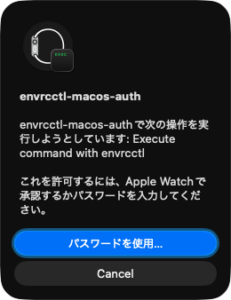
そして、危険なことに気がついた。ZedのAIエージェントはttyを持ってる。まずい、envrcctl経由でKeychainアクセスできるわ…。
追記:stdinは/dev/nullにリダイレクトされているので、sys.stdin.isatty()はfalseに判定される。たぶん、大丈夫、なはず…。
    let shell = project
        .update(cx, |project, cx| {
            project
                .remote_client()
                .and_then(|r| r.read(cx).default_system_shell())
                .map(Shell::Program)
        })
        .unwrap_or_else(|| Shell::Program(get_default_system_shell_preferring_bash()));
    let is_windows = project.read_with(cx, |project, cx| project.path_style(cx).is_windows());
    let (task_command, task_args) = task::ShellBuilder::new(&shell, is_windows)
        .redirect_stdin_to_dev_null()
        .build(Some(command.clone()), &args);
def _is_interactive() -> bool:
return sys.stdin.isatty() and sys.stdout.isatty()追記:大丈夫でした。やはり、sys.stdin.isatty()はfalseになる。